
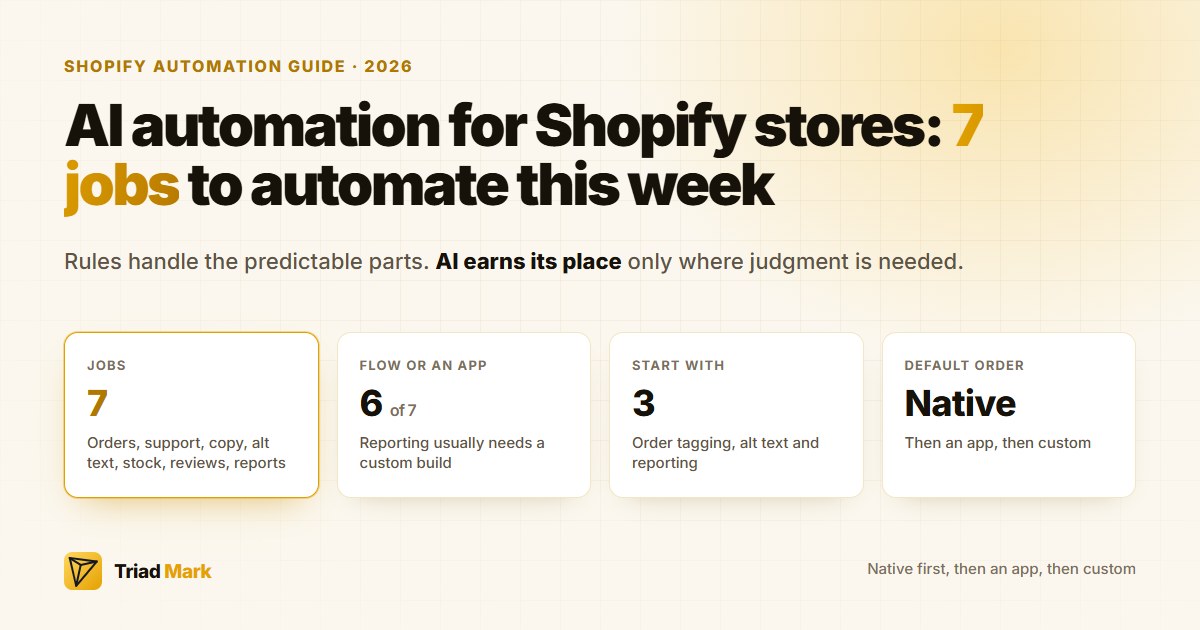
There are seven jobs that are ready for AI automation for Shopify stores right now. These include order tagging, support-reply drafts, product descriptions, image alt text, low-stock alerts, review requests, and reporting digests. Rules handle the predictable parts.
AI only earns a place on steps that need to read free text, read an image, or draft something new.
Six of the seven run inside Shopify Flow or an app. Reporting usually needs a custom build.
| # | Workflow | Where AI helps | Tool route | Realistic time saved |
|---|---|---|---|---|
| 1 | Order tagging | Reading free-text notes | Shopify Flow + classifier | 2-4 hrs/week |
| 2 | Support replies | Intent and grounded drafts | Support app's AI (Gorgias, Inbox) | 4-8 hrs/week |
| 3 | Product descriptions | Drafting from verified specs | Shopify Magic or an app | 30-60 min/product |
| 4 | Image alt text | Drafting a description per image | AI Alt Image Text SEO app | Full catalog backfill in a day |
| 5 | Low-stock alerts | Rarely needed, rules cover it | Shopify Flow, native | 1-2 hrs/week |
| 6 | Review requests | Optional copy and summaries | Judge.me, Loox, Yotpo | 2-3 hrs/week |
| 7 | Reporting digests | Explaining the anomalies | Custom integration | 3-5 hrs/week |
The time-saved column is a typical range from past builds, not a promise. The measurement section below shows how to work out your own number.
Rules vs. AI: what Shopify Flow actually does
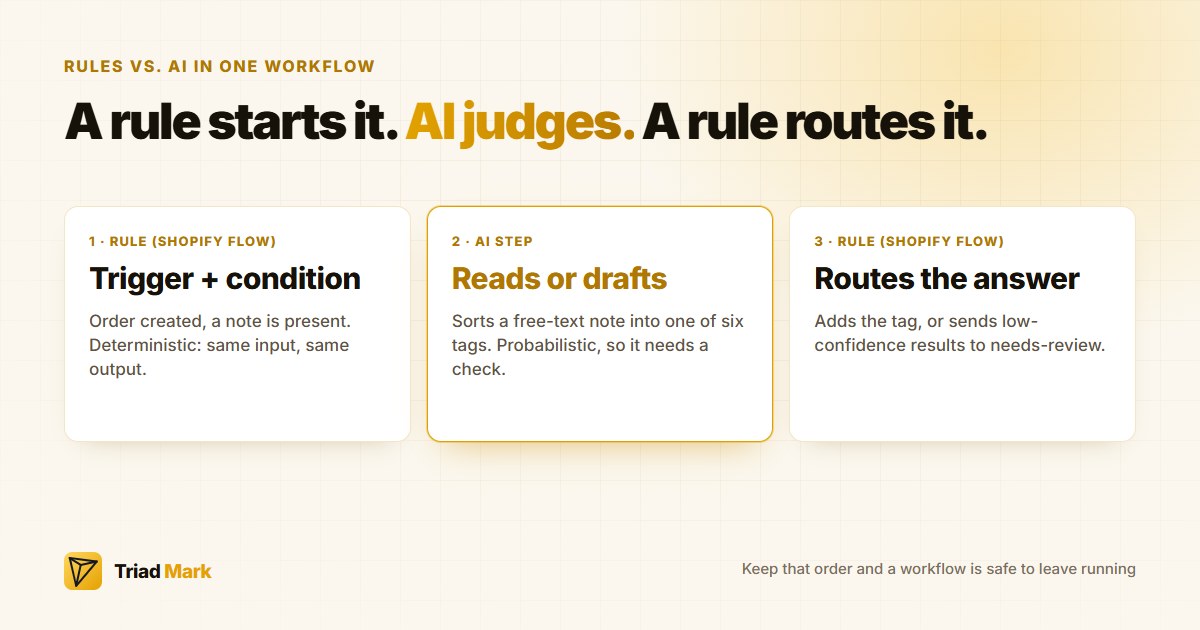
Shopify Flow runs on triggers, conditions and actions you set up yourself. It's a rules engine, not AI. AI only enters a workflow when a step has to read free text, read an image, or write something new.
Most of the workflows below mix both. A rule starts the workflow. AI handles the part that needs judgment.
A rule routes what AI hands back. Keep that order in mind. It's what makes a workflow safe to leave running unattended.
| Rules (Shopify Flow) | AI | |
|---|---|---|
| What it does | Runs a predictable action | Reads or writes something unstructured |
| Example | If order total is over £500, add the VIP tag | Sort this delivery note into one of six tags |
| Reliability | Deterministic: same input, same output | Probabilistic, needs a review step |
| Cost | Included with Flow | Per call, per token, or an app subscription |
| Best fit | A clear condition and a clear action | Language, images, or copy that needs drafting |
| Main risk | The rule goes stale as the business changes | A confidently wrong answer |
Flow itself is free on the Basic, Grow, Advanced and Plus plans. The Send HTTP request action, which most AI-connected workflows need to call an outside classifier or model, is on Grow and up.
A Basic store can still use Flow's native actions; it just can't wire Flow directly to an external AI service without upgrading, or routing the call through an app that does it on Flow's behalf.
AI automation for Shopify stores: How to decide what to automate first
Four questions filter out the automation that isn't worth setting up.
- Volume. Does the job happen more than 10 times a week? Below that, the setup time rarely pays back.
- Variance. Does the wording change while the meaning stays the same? That's where AI helps. The same input every time is a job for rules.
- Reversibility. If the automation gets it wrong, how expensive is the fix? A published description or a sent reply needs an approval step first. An internal tag doesn't.
- Measurability. Can you count the minutes saved or the errors caught? If not, there's no way to justify keeping it running.
| Workflow | Volume | Variance | Reversibility | Measurable | Start here? |
|---|---|---|---|---|---|
| Order tagging | High | Low-medium | High, easy to re-tag | Yes | Yes |
| Support replies | Medium-high | High | Low, customer-facing | Yes | After an approval step |
| Product descriptions | Burst | Medium | Medium, review before publish | Yes | Yes, in batches |
| Image alt text | Burst | Low | High | Yes | Yes |
| Stock alerts | High | Low | High | Harder to measure | Yes, as rules first |
| Review requests | High | Low | Medium | Yes | Yes |
| Reporting | Daily | Low-medium | High, internal | Yes | Yes |
Order tagging, alt text and reporting are the easiest places to start. All three are high-volume, low-risk, and easy to measure.
How to set up each AI automation workflow for Shopify stores
Every AI automation workflow for Shopify stores below follows the same shape:
- what it replaces,
- the trigger and condition,
- where AI actually helps,
- the route to build it,
- a test case,
- a failure case,
- the point that needs a human, and
- the one metric worth tracking.
Read the first one closely and you can scan the rest for just the part you need.
1. Order tagging
- Replaces: staff reading order notes and tagging VIP, wholesale, risk-review or gift orders by hand.
- Trigger: order created or order updated.
- Condition: cart value above a threshold, line-item count, a discount code, or a free-text note.
- Action: add order tags, optionally after an AI step reads the free-text note.
- Where AI helps: turning a free-text note into one of a known set of tags. Everything else is a rule.
- Route: native Flow on Basic and up. Add a Send HTTP request step to an AI classifier on Grow, Advanced or Plus if a note needs reading.
- Test case: a note reads "please leave at back door, gate code 4421" and gets tagged delivery-instructions.
- Failure case: a note reads "cancel this one if the other ships" and the classifier mis-tags it as a delivery note. Caught by routing anything under a confidence threshold to a needs-review tag instead of guessing.
- Approval: none needed for tagging. The confidence threshold handles the edge cases.
- Measure: minutes of manual tagging saved per week, plus the misclassification rate on a weekly sample of 20 orders.
2. Customer support replies
- Replaces: first-response drafting for order-status, refund and shipping questions.
- Trigger: a new ticket in the support tool (Gorgias, Zendesk, Help Scout, Shopify Inbox).
- Condition: an intent classifier returns order status, refund request, shipping ETA, product question, or other.
- Action: pull the customer's order, match it against policy, draft a reply, queue it for a human to send.
- Where AI helps: reading intent and drafting a reply grounded in real order data instead of invented detail.
- Route: an app (Gorgias AI, Shopify Inbox AI) for most stores. A custom build when the reply has to pull from several systems at once, such as an ERP, a policy base and 3PL tracking: this is where custom AI workflow development comes in.
- Test case: "Where is my order #1234?" returns a draft with the real tracking link and ETA.
- Failure case: a customer asks a warranty question and the AI invents an answer. Caught because refund, warranty, complaint and VIP tickets always force a human-approval step.
- Approval: required on refunds, warranty questions, complaints and VIP-flagged tickets.
- Measure: average handling time, correction rate on AI drafts, escalation accuracy.
3. Product descriptions
- Replaces: writing and rewriting product copy from spec sheets, especially during a catalog migration or a seasonal refresh.
- Trigger: a product is created, or someone tags it needs-description.
- Condition: variant count, category, or a missing-description check.
- Action: pull the verified attributes (title, materials, dimensions, care), draft the copy, save it as a draft.
- Where AI helps: turning verified facts into readable copy that matches a tone sample.
- Route: Shopify Magic for stores that stay inside Shopify's own tools. An app (Describely, Copy.ai) for tighter brand-voice control. Custom for a migration past 1,000 SKUs, checked against a spec database.
- Test case: a spec sheet for a wool jumper produces a draft that names the material, the fit, and the wash care, in the brand's voice.
- Failure case: the draft adds a claim the spec sheet never made, such as "ethically sourced." Caught by a fact-check pass against the source attributes before anything publishes.
- Approval: required before status moves from draft to active.
- Measure: editing time per description, factual-error rate, descriptions published per week.
4. Image alt text
- Replaces: writing alt text for every product image, every variant, every lifestyle shot.
- Trigger: a product image is uploaded, or someone tags the product needs-alt.
- Condition: the image has no alt text, or its alt text still matches a default template.
- Action: generate a description from the product's attributes and the image itself, and write it to the alt field.
- Where AI helps: drafting alt text that actually names the product and what's visible in the shot.
- Route: an app. Triad Mark's own AI Alt Image Text SEO handles both the catalog backfill and new uploads from one place.
- Test case: a photo of a navy linen shirt on a hanger gets alt text like "Navy linen button-down shirt on a wooden hanger, front view." Accurate, no stuffed keywords.
- Failure case: a size chart gets labelled "product photo." Caught by sampling the first 20 images on a new product before trusting the rest to run on their own.
- Approval: a spot-check on a sample is enough. Not every image needs a human look.
- Measure: alt-text coverage across the catalog, correction rate on a weekly sample of 20.
- Worth saying plainly: alt text alone won't move your rankings. It's an accessibility signal and a factor in image-search click-through, not a direct lever on Google's main results.
5. Low-stock alerts
- Replaces: staff checking inventory dashboards and messaging suppliers once a SKU drops below its reorder point.
- Trigger: inventory quantity changed.
- Condition: on-hand quantity crosses a threshold set per product.
- Action: email the owner, post to Slack, or create a draft purchase order.
- Where AI helps: almost nothing. This is rules work. An optional AI layer can summarise weekly stock pressure or rank reorders by sales velocity.
- Route: native Flow for the alert. An app or a custom build only if you want AI ranking the reorders.
- Test case: stock drops from 6 to 5 while the threshold is 5, and exactly one alert goes out.
- Failure case: a restock arrives and the quantity crosses the threshold back and forth, firing alerts repeatedly. Caught with a metafield that blocks a repeat alert for 24 hours.
- Approval: none for the alert. Required for the draft purchase order.
- Measure: stock-outs avoided per month, false-alert rate.
6. Review requests
- Replaces: timing review-request emails by hand, or running everyone through the same generic 14-day drip.
- Trigger: a fulfilment event with delivery confirmation, from the carrier or Shopify's own shipping update.
- Condition: the order isn't refunded or cancelled, hasn't already had a request sent, and the customer opted into marketing.
- Action: schedule the review request 3 to 5 days after delivery through the review app's own API.
- Where AI helps: optional. It can draft request copy by product category, or summarise incoming reviews into weekly themes.
- Route: an app (Judge.me, Loox, Yotpo, Okendo) sends it. Flow checks eligibility. Custom only if the review platform's own filters can't handle cancellations correctly.
- Test case: an order is delivered with marketing consent on file, and the request is queued for day 4.
- Failure case: an order is refunded on day 2 but the request still goes out. Caught by checking for a cancellation or refund right before sending, not only at the start.
- Approval: none for a standard send. Required for VIP or complaint-flagged customers.
- Measure: request-to-review conversion rate, unsubscribe rate, duplicate-send rate.
- Worth clarifying: Shopify's own "Shop Review Published" event fires on a new published review. That's a different trigger from the delivery event that starts the request, and the two are easy to mix up.
7. Reporting and digests
- Replaces: the Monday-morning scramble to pull yesterday's numbers, and the weekly ops report that never gets written on time.
- Trigger: scheduled. Daily at 08:00 local time, or weekly on Monday.
- Condition: the data pull worked, and last period's numbers are there to compare against.
- Action: pull metrics from the Shopify Admin API, ad platforms and the review app, calculate the numbers, draft a summary, send it by email or Slack.
- Where AI helps: explaining the anomaly ("conversion dipped 0.4 points, driven by mobile checkout drop-off at the shipping step"), not calculating the numbers themselves.
- Route: a custom integration. This is the workflow that most often needs a custom Shopify reporting integration. Off-the-shelf dashboards show numbers; they rarely write a digest with an explanation attached.
- Test case: yesterday's report lands at 08:00 with revenue, orders, average order value, the top three products, and one paragraph on what moved.
- Failure case: an API throttles and the digest comes back blank. Caught by a fallback message ("numbers missing, check source") instead of an empty email.
- Approval: none for an internal digest. Required if any version of it goes to a customer.
- Measure: time saved on manual reporting, the percentage of days the digest lands on time, how many flagged anomalies turn out to be real signal rather than noise.
Native, app, or custom: how to choose AI automation for Shopify stores
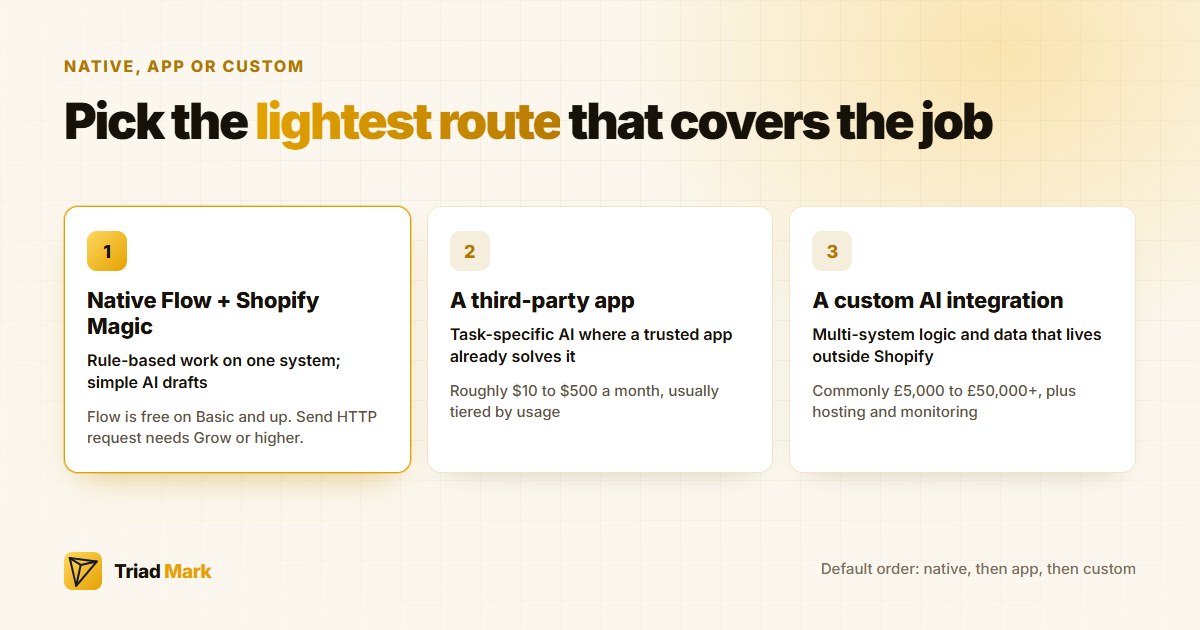
Start with native rules. Add an app once the task needs AI or has to touch another platform. Build custom only when no app covers every system you need.
| Route | When it fits | Cost | Limits |
|---|---|---|---|
| Native Flow + Shopify Magic | Rule-based work on one system; simple AI drafts for descriptions | Flow is free on Basic and up; the Send HTTP request action needs Grow or higher | No persistent memory, no joining several systems, limited branching |
| A third-party app (Gorgias, Judge.me, AI Alt Image Text SEO) | Task-specific AI where a trusted app already solves it | Roughly $10 to $500 a month, usually tiered by usage | Bends only as far as the app's own scope |
| A custom AI integration | Multi-system logic, rules specific to your business, data that lives outside Shopify | A project build, commonly £5,000 to £50,000+, plus hosting and monitoring | Needs engineering, evaluation and upkeep |
A short decision path:
- Can Flow do it with rules alone? Use Flow.
- Does it need AI, but only on Shopify's own data, in a category apps already cover well? Use a reputable app.
- Does the task span Shopify and another system, such as an ERP, a 3PL, support, or ad platforms? Build custom.
- Is the logic specific enough that no app will ever fit? Build custom.
- Default order: native, then app, then custom. Jumping straight to custom because it sounds more impressive usually costs more than it returns.
Shopify changes its plan features from time to time. Check the current breakdown on help.shopify.com before you commit to a plan on the strength of this table.
How to measure what you automated
If you take one formula from this article, make it this one.
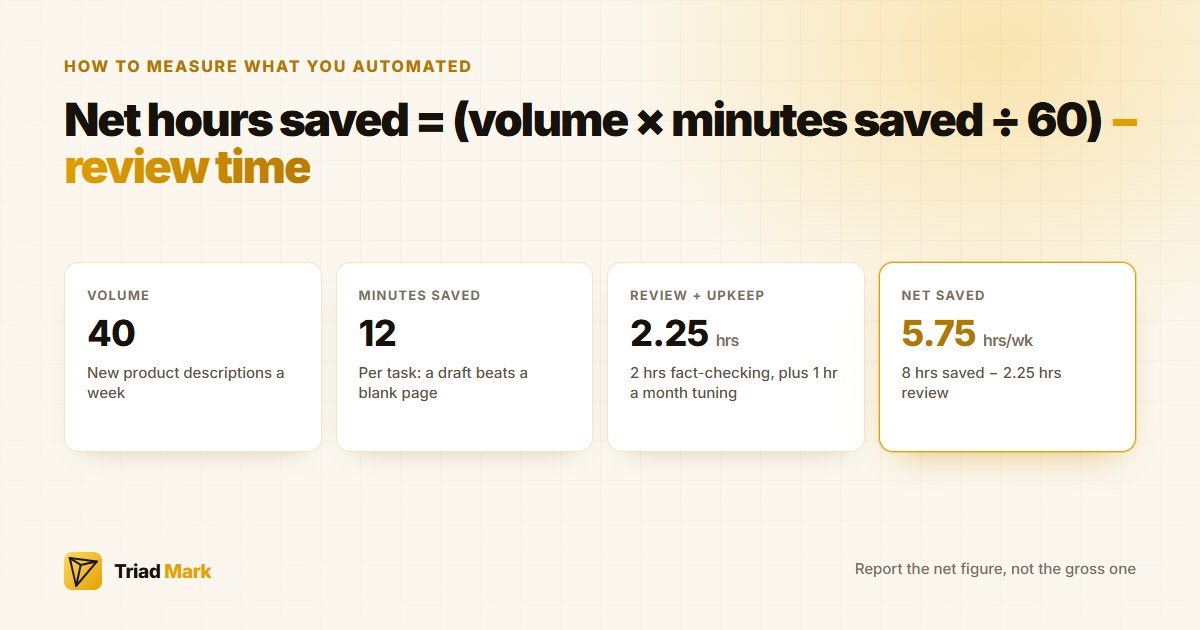
Net hours saved per week = (task volume x minutes saved per task / 60) - review and maintenance hours
A worked example:
- Task: product-description drafts
- Volume: 40 new products a week
- Minutes saved per task: 12 (a draft beats a blank page)
- Review and maintenance: 2 hours a week fact-checking, plus 1 hour a month tuning
- Net hours: (40 x 12 / 60) - 2.25 = 8 - 2.25 = 5.75 hours a week
What to track per workflow:
| Metric type | Example | Why it matters |
|---|---|---|
| Time | Minutes per ticket, per description, per order | The main return-on-investment number |
| Quality | Correction rate, misclassification rate | AI without a quality check decays quietly |
| Volume | Items processed per week | Catches a drop that means the trigger broke |
| Cost | API spend, app subscription, maintenance hours | Report the net figure, not the gross one |
| Business outcome | Reply time, review response rate, stock-outs avoided | Ties the workflow to a number the owner actually cares about |
Keep the calculated figures, such as revenue, orders and time, separate from anything AI wrote, such as an anomaly explanation or a theme summary.
Label each clearly in the digest: the data row is the fact, the AI's paragraph is interpretation. That one habit is what keeps an AI report trusted past the first week.
Final word on AI automation for Shopify stores
Start with whichever workflow scored "yes" in the prioritisation table and costs the least to undo. Order tagging, alt text and reporting are the usual starting points: high volume, low risk, easy to measure.
Have an AI workflow that spans Shopify, support, and other business systems? Tell us what starts the process, which systems it touches, and what outcome you need.
We'll come back with a scope and a cost range before any build: talk to Triad Mark.
FAQs
Is Shopify Flow AI?
No. Shopify Flow is a rules-based workflow system built on triggers, conditions and actions. AI enters a workflow only when a step needs to read language, an image, or free text.
Which Shopify plan do I need for AI automation?
Shopify Flow is available on Basic and up. The Send HTTP request action, which most AI workflows depend on, needs Grow, Advanced or Plus. Shopify Magic is included across plans.
Can I automate Shopify without writing code?
Yes, for the first four workflows here. Order tagging, support replies, product descriptions and alt text all have native or app routes that need no code. Custom reporting and multi-system integrations do.
What's the fastest Shopify automation to set up this week?
Order tagging in Shopify Flow: one trigger, one condition, one tag action. Most stores have a working rule running in under 30 minutes.
Does Shopify generate product descriptions with AI?
Yes. Shopify Magic drafts descriptions from a product's own attributes. For large catalogs or a stricter brand voice, a dedicated app or a custom workflow gives more control.
How does AI alt text affect SEO?
Alt text is an accessibility signal and a factor in image-search click-through, not a direct lever on Google's rankings. AI alt generation at scale improves coverage. It doesn't promise a ranking gain on its own.
Can AI handle my customer support on Shopify?
AI can draft replies and sort tickets by intent. A human still has to approve refunds, warranty responses and complaints. Full autonomous handling for everything isn't a safe target yet.
How do I stop low-stock alerts from spamming my inbox?
Use a metafield that records when the last alert fired, and block a repeat alert for 24 hours after a threshold crossing. That's a rules problem, not an AI problem.
When should I use a Shopify app instead of a custom AI integration?
Use an app when a trusted one already covers the category and your logic fits its scope. Build custom when the workflow spans Shopify plus other systems, or the logic is specific enough that no app fits.
How do I measure whether my Shopify automation is working?
Track net hours saved (volume times minutes saved, minus maintenance), a quality metric such as correction rate, and one business outcome like reply time or stock-outs avoided.